The impending enforcement of requirements for European Accessibility Act (EAA) compliance will have substantial effects for public and private sector organizations across the European Union. The EAA will require all digital documents to be accessible to individuals with various disabilities. Naturally, this legislation covers PDF documents and so ensuring PDFs are accessible is more than just an obligation. Failure to comply could result in significant penalties, including fines and legal actions.
For a general overview of the EAA and its requirements, you can refer to this recent article on the Apryse website. However, for this article we are going to focus on its consequences for how organizations generate PDFs for public consumption, and how iText can help ensure the content in PDF documents is accessible to all.
An Introduction to PDF Accessibility
You may have heard claims along the lines of “PDFs are not accessible,” i.e., PDF documents are difficult—if not impossible—to be read by people with disabilities. However, the actual truth is more complex. There are many PDF documents that are woefully inaccessible, but this is by no means an inherent fault of the format. In fact, it has been possible to create accessible PDF documents for over 25 years, but doing so requires not just capable software, but also the will to do so.
The point is, PDF was originally developed to be a universal file format that preserved the layout and formatting of documents across different systems and platforms. After a slow start, its usage exploded in the mid-1990s for distributing digital documents of all kinds. One early adopter of the PDF format was the US Internal Revenue Service (IRS) since it enabled the easy distribution of electronic tax forms and publications.
In just a few years, downloading and filling out PDF forms from various government departments around the world became commonplace. However, it wasn’t until the end of the decade that the subject of ensuring these PDFs were accessible entered the conversation.
The Dawn of Accessibility Regulations
PDF accessibility was barely a consideration until the 1998 amendments to Section 508 of the Rehabilitation Act. The US Access Board published a final rule in 2017 updating the accessibility requirements to include specific accessibility standards for electronic documents. Suddenly, it was now a legal requirement that PDFs were accessible to all, and to ensure the software used could produce them.
The impending deadline for compliance with the European Accessibility Act (EAA) adds more fuel to the PDF accessibility fire. Fortunately, Apryse provides various solutions to achieve EAA-compliant PDF documents; one of which is the iText SDK. Thanks to recent improvements and additions to iText, creating or generating PDF documents compliant with the EAA regulations is easier than ever before.
Before we explore how to create accessible PDFs with iText, we should look at the key to making PDF documents accessible in the first place: Tagged PDF.
Tagged PDF and the Road to PDF/UA
The concept of "Tagged PDF" was introduced in PDF 1.4 in 2001. This feature enabled the embedding of semantic structures such as headings, lists, tables, and figures, allowing assistive technologies to interpret and present the content accurately. Tagged PDF ensures predictable reading order and document navigation, which are crucial for accessibility.

Tagged PDF is foundational to the PDF/UA standard for universal accessibility, as well as the PDF/A archiving standard which preceded it. You can find more details in the PDF Association’s Tagged PDF Q & A, but the following explains how each standard utilizes Tagged PDF:
PDF/A – ISO 19005
The PDF/A standard focuses on long-term preservation, ensuring documents are self-contained and can be reproduced accurately. However, from the very beginning the issue of accessibility was also considered. The PDF/A-1 standard from 2008 defined two conformance levels. Level B (for Basic) focused on a minimal set of requirements to reliably reproduce a document’s visual appearance. Level A (for Accessible) extended these requirements to both improve a document’s accessibility and enable reliable text extraction.
A further conformance level was introduced with the PDF/A-3 revision, which was based on the PDF 1.7 specification. Level U (for Unicode) specifies that text in documents is stored in Unicode format, although Tagged PDF features are not a requirement for conformance.
The most recent revision to the PDF/A standard is PDF/A-4 which is designed around the PDF 2.0 specification. Major differences in PDF/A-4 include a simplified system of conformance levels, and improvements for metadata support and embedded files. Most importantly for this article is that provisions for accessibility are no longer part of the PDF/A standard, since these are now comprehensively addressed by PDF/UA. You can learn about iText’s support for PDF/A-4 and its features on the iText Knowledge Base.
While PDF/A is not our focus for today, there are cases where conforming to both standards may be required. We’ll come back to this point after discussing the PDF/UA standards.
PDF/UA – ISO 14289
First published in 2012, the PDF/UA standard was published to specifically address accessibility, requiring detailed tagging and logical structure to make documents usable by individuals with disabilities. Based on the PDF 1.7 specification, it was revised in 2014 as ISO 14289-1:2014 with a variety of corrections. Following the development and eventual publication of PDF/UA-2 as ISO 14289-2:2024, the earlier standard became known as PDF/UA-1.
You can find more information on the differences between the two in our article on PDF/UA-2 and its related-Well Tagged PDF (WTPDF) standard. However, the main differentiator is that PDF/UA-2 is intended for documents conforming to the PDF 2.0 specification, while PDF/UA-1 was (and remains) intended for PDF 1.7 documents. It’s perfectly valid to still target PDF/UA-1 conformance to achieve accessible PDFs if you’re not producing PDF 2.0 documents.
Dual Conformance with PDF/UA and PDF/A
While the PDF/A and PDF/UA standards have different goals, there are cases where meeting requirements for both standards are desirable. Government and healthcare records, legal documents, plus libraries and archives. For example, the US Library of Congress states that as “an unencrypted PDF document compliant with PDF/UA may also comply with requirements for PDF/A, files that conform to PDF/UA in addition to PDF/A are considered a preferred format for page-oriented content by the Library of Congress.”
Again, the PDF Association has guidance and recommendations for such cases, so we recommend reading it for a comprehensive understanding of the compatibility between various editions of PDF/A and PDF/UA.
Accessibility Legislation Around the World
Both the PDF/A and PDF/UA standards utilize the Tagged PDF feature for the semantic information necessary for accessible documents, and the basis for PDF/UA accessibility requirements is the W3C’s Web Content Accessibility Guidelines (WCAG). Thus, PDF/UA conformance is a common requirement of accessibility regulations around the world.
Aside from the EAA regulations in Europe, a notable example in the US is Section 508 of the Rehabilitation Act which we mentioned earlier. The US Access Board’s updated Section 508 rules from 2017 specify PDF/UA-1 support for PDF creation software that produces PDF 1.7 files. In addition, there is the Americans with Disabilities Act. While not explicitly mentioning PDF/UA, the ADA does require accessible communication, which includes ensuring that PDF documents are accessible.
Other examples from around the world include the Accessible Canada Act (ACA), and the UK Accessibility Regulations. Again, these regulations aim to ensure all digital content is accessible, including PDF documents.
Why Are So Many PDFs Inaccessible?
With all that said, the question of why there are so many inaccessible PDF documents remains. Perhaps the primary cause is a lack of awareness and understanding of the issue. Many document creators are simply unaware of the accessibility features available in PDF or how to implement them. There has also been a historical lack of emphasis on accessibility in digital content creation, leading to a backlog of PDFs which are not just inaccessible, but contain no semantic structure at all.
Another very common cause is scanned documents which are just an image embedded in a PDF container. Screen readers or other assistive software simply cannot process such documents. This can be alleviated somewhat using OCR processing to add a layer of recognized text to the document structure, though even with modern AI or LLM-powered solutions this is not a silver bullet.
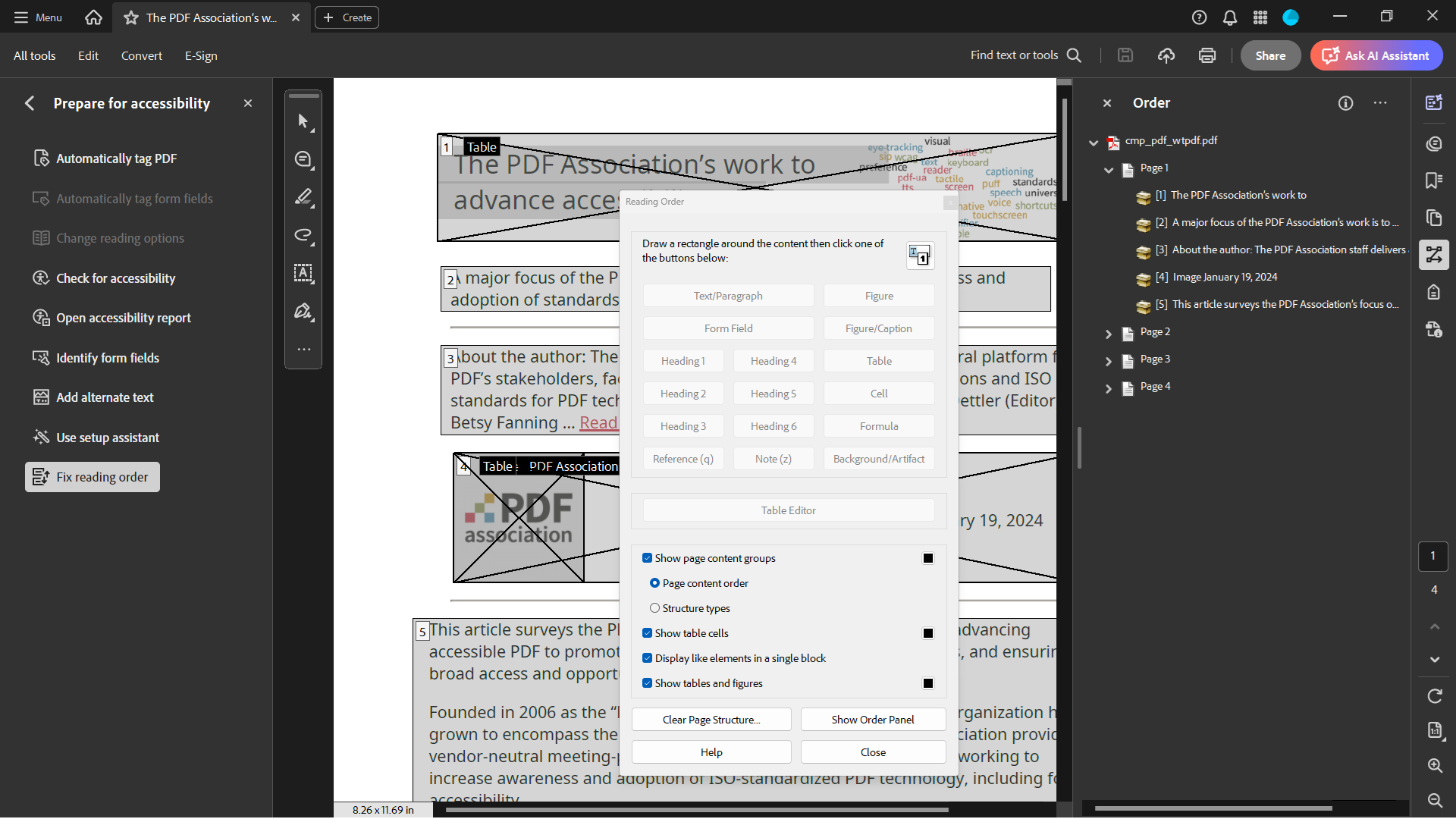
Speaking of document structure, this is the other main factor. Creating accessible PDFs adds complexity to the process, since document elements need descriptive metadata such as tags and alternative text to be processed correctly by screen readers or other assistive software. Other structural requirements include a logical reading order and other navigational aids, such as bookmarks or a table of contents.
The point of this article is not to provide a comprehensive list of requirements for accessible PDFs though. There are more suitable resources for this information, and it should arguably be the job of software to solve these problems for users.
In fact, this is increasingly the case—and improving PDF/UA functionality has been a major part of iText’s recent development roadmap. Even if you’re already using iText to produce PDF/UA documents, you may discover that these improvements would significantly help to optimize existing document workflows.
How Developers Can Improve PDF Accessibility with iText
Open-source software often plays a vital role in popularizing the adoption of new standards and technologies. With its dual AGPL and commercial licensing options, iText empowers developers to create new and innovative solutions for document generation and manipulation. Since iText is so widely used for server-side PDF creation, these developers can play a crucial role in ensuring PDF documents are accessible to all in the future.
For these reasons, the iText development team has made extensive enhancements to PDF/UA functionality in recent years. In this section we’ll explore how iText’s powerful layout engine and dedicated high-level APIs enable you to easily create accessible PDFs either from scratch, or from HTML templates.
Creating PDF/UA from Scratch
As mentioned earlier, the PDF/UA standard is a development of the Tagged PDF feature. Creating a Tagged PDF is remarkably simple and straightforward in iText Core. By using the pdf.setTagged() method in your code, iText will automatically begin tagging document elements for you. As you add elements like paragraphs, images, tables, etc., they are assigned structural tags based on their type.
Tagged PDF is a good start to making accessible PDFs and significantly helps semantic analysis and reuse. However, to conform to the PDF/UA requirements requires than just structural tags. To enable assistive technologies to interpret the content accurately, essential metadata such as the document title, author, and language are also needed as well as alternative text descriptions for images and other non-text content.
To assist developers, recent iText releases have focused on improving Tagged PDF and PDF/UA functionality. In particular, iText Core 8.0.4 extended the tagging mechanism to support the IAccessibleElement (Java/.NET) interface for form fields, enabling PDF/UA-related metadata to be more easily accessed and changed.
It also introduced the PdfUADocument (Java/.NET), and PdfUAConfig (Java/.NET) classes which greatly improved the developer experience when working with accessible documents. The old method required first instantiating a PdfDocument and then customizing it with WriterProperties to add metadata, set the PDF version, and remembering to set the document as tagged. Then, you’d need to include lines of low-level code just to set the document title and language, as shown in the following code snippet:
PdfDocument pdfDoc = new PdfDocument(new PdfWriter(dest,
    new WriterProperties().addUAXmpMetadata().setPdfVersion(PdfVersion.PDF_1_7)));

Document document = new Document(pdfDoc, PageSize.A4.rotate());

pdfDoc.setTagged();
pdfDoc.getCatalog().setViewerPreferences(new PdfViewerPreferences().setDisplayDocTitle(true));
pdfDoc.getCatalog().setLang(new PdfString("en-US"));
PdfDocumentInfo info = pdfDoc.getDocumentInfo();
info.setTitle("English pangram");
As a comparison, here is the same operation using the current implementation:
PdfDocument pdfDoc = new PdfUADocument(new PdfWriter(dest),
    new PdfUAConfig(PdfUAConformance.PDF_UA_1, "Some title", "en-US"));
Document document = new Document(pdfDoc, PageSize.A4.rotate());
The above is taken from our PDF/UA example for Java, and we have an equivalent example for .NET.
As you can see, this is hugely simplified thanks to the new high-level APIs which enable you to simply choose a PDF/UA conformance level (in this case PDF/UA-1) and set the document title and language. Behind the scenes, iText does all the hard work for you!
Not only that, but iText automatically performs validation checks for PDF/UA documents during the creation process. These checks are based on the PDF Association’s Matterhorn Protocol which defines rules for PDF/UA conformance. If iText detects any accessibility issues, it produces detailed error reports to assist developers identify and fix them.
Note that the above example shows further conformance improvements introduced in iText Core 9.2.0. Additionally, both PDF/UA and PDF/A conformance checking were refactored to simplify validation and more easily support future standards. You can find more information on these changes on the Knowledge Base.
Direct Conversion of HTML to PDF/UA
Rather than create PDF/UA documents from scratch, another option is to use HTML as a starting point. This makes sense in many use cases, as HTML is familiar to developers and supports accessibility features like alternative text for images and semantic elements which can be translated directly into PDF.
iText Core’s API takes a lot of inspiration from HTML’s Document Object Model (DOM) for constructing PDF content, and the pdfHTML add-on extends the API to vastly improve upon previous iText solutions for HTML and XML conversion. It is particularly useful for generating PDFs from reusable templates, and similar to iText Core’s PDF/UA improvements, recent additions to pdfHTML enable seamless conversion to accessible PDF/UA documents in a single step. Again, the Knowledge Base has more details on the API changes, together with handy code samples.
In addition to the established PDF/UA-1 standard required for compliance with the EAA and similar regulations, pdfHTML also supports conversion to the latest PDF/UA-2 standard for PDF 2.0 documents—just like iText Core. This means you can create documents that leverage the latest accessibility features and improvements and exceed the current regulatory requirements, if necessary.
You can also easily target PDF/UA and PDF/A conformance at the same time with pdfHTML. The Wtpdf example (Java/.NET) demonstrates transforming HTML into an accessible PDF/UA-2 document that also conforms to the latest PDF/A-4 standard for archiving. Not only that, but the generated PDF also meets the additional requirements of Well-Tagged PDF, the state-of-the-art in PDF accessibility and content reusability.
Why Isn’t Tagged PDF or PDF/UA the Default for iText?
You might be wondering “why does iText does not simply produce Tagged PDFs or even PDF/UA documents by default?” There would certainly be benefits to this approach, and not only so organizations can comply with accessibility regulations. In addition to fostering inclusivity to those with disabilities, making PDFs more accessible has huge benefits for non-humans too. Properly tagged and structured PDFs help AI and LLMs to more easily process properly tagged and structured PDFs without needing OCR, making data extraction and reuse faster and more accurate.
On the other hand, enforcing tagging by default would limit flexibility for developers, and there are other things to consider. While CPU speeds are orders of magnitude faster than when Tagged PDF was introduced, it does incur a certain performance hit, with increased memory and storage requirements.
Not every PDF requires accessibility features—at least for now. However, there is a convincing argument to be made that all PDFs meant for public consumption should be accessible. For the time being though, iText will leave this choice up to developers.
Getting Started with iText
Everything we’ve covered in this article is freely available for you to try out yourself under the AGPLv3 license terms. You’ll find links to download iText Core and pdfHTML from various open-source repositories on our Downloads page, along with the relevant installation guides for Java and .NET.
If you’re interested in exploring the full capabilities of the iText SDK, we offer a free 30-day trial for the entire iText Suite. This enables you to try out iText Core and all the open and closed-source add-ons, completely free. During the trial period, you are covered by our commercial license terms and so are exempt from the AGPLv3 conditions.
Accessibility Across Apryse
As part of the Apryse family of products, iText is not the only piece of the accessibility puzzle. Apryse solutions go beyond PDF to encompass the entire document life cycle, enabling organizations to comply with EAA regulations and similar legislation across the globe.
Here is a brief summary of various features and solutions in the Apryse portfolio:
- The Apryse SDK enables conversion from Word documents or auto tagging existing PDFs for PDF/UA-1 conformance.
- For the Web SDK, the Apryse WebViewer UI was recently updated for compliance with the WCAG 2.2 AA guidelines. This actually exceeds the EAA requirements, which currently specify WCAG 2.1 AA compliance. Of course, WebViewer can also display PDF/UA documents, and much more besides.
- Fluent is a versatile template creation solution, which offers PDF/UA-1 as one of its output options.
- The Xodo PDF Studio is a desktop PDF application which allows PDFs to be automatically tagged and validated for PDF/UA-1 conformance.
Apryse actively participates in the PDF Association and its Working Groups, as well as the ISO committees for PDF. These efforts help to define and refine modern PDF standards and also drive their wider adoption across the industry.
In addition, Apryse is one of the sponsors enabling the PDF 2.0 specification to be available at no cost, and recently the PDF/UA bundle has joined the list of sponsored standards available from the PDF Association site. For those interested in the latest developments in PDF accessibility, this is a must-have.
Ensuring the Future of Accessible PDFs
With PDF/UA and related standards building on Tagged PDF, the ability to make PDFs accessible to all is within our reach. However, achieving this goal requires a concerted and combined effort from document creators and organizations. Perhaps more importantly, laws and regulations like the EAA will undoubtedly drive more organizations to adopt accessibility practices.
This Increasing regulatory pressure may be what will ensure PDFs are accessible to all users, regardless of their abilities. Accessible PDFs are not just a legal requirement; they are a moral imperative. By fully leveraging iText’s abilities for accessible PDF creation and validation, developers can play a hugely significant role in creating a more inclusive digital environment for everyone.
In conclusion, we have the tools and standards to make accessible PDF documents. However, it’s up to everyone to use them effectively and ensure no one is left behind.