pdfOCR
The pdfOCR add-on for iText Core offers advanced Optical Character Recognition functionality for scanned documents and images. Choose either the brand-new ONNX-based AI OCR, the traditional Tesseract 4 implementation, or connect to your own custom OCR engine —it's up to you!
Each day, scanned letters, invoices, contracts etc. must be processed, But without machine-readable text, the content cannot be edited, searched, or indexed. With pdfOCR, you can convert such documents into fully ISO-compliant PDF or PDF/A-3u files with embedded text layers, or extract the recognized text as a file for further processing or reuse.
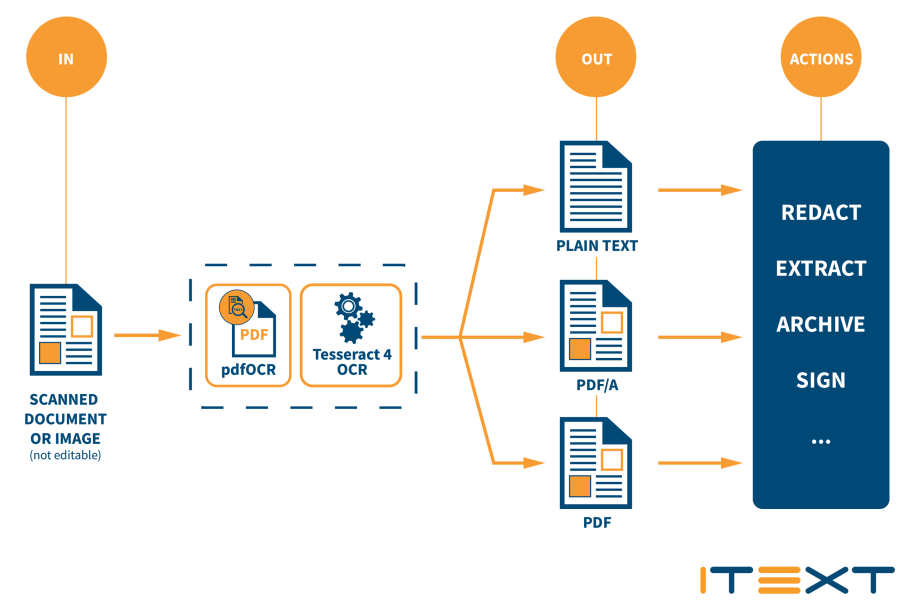
How it works
Take a look at how easy it is to OCR a list of images and create a PDF file!
The Best in Open-Source OCR Technology
Our new and improved pdfOCR add-on utilizes the state-of-the-art in open-source text detection and recognition technology: Its built-in support for Deep Learning models under the Open Neural Network Exchange (ONNX) standard represents a significant evolution over our previous Tesseract-based implementation.
Based on the OnnxTR wrapper for the popular docTR engine, pdfOCR's implementation supports multiple freely-available pre-trained models. The model we use for tests runs 100% locally, and is less than 100MB. Despite that, it is significantly faster and more accurate than Tesseract 4, and has lower resource requirements.
The release of pdfOCR 5.0.0 added support for PaddleOCR and EasyOCR, adding to the docTR models supported in earlier releases. These pretrained models are extremely performant, and are available for multiple languages. Not only that, the ONNX engine supports either CPU or GPU execution for OCR tasks, making the most of your available hardware.
As well as choosing from the supported ONNX models, you can also use your own custom OCR engines, or the traditional Tesseract 4 module if you prefer. From the beginning, we made pdfOCR's API open and extensible, and the new ONNX module is no exception.
What does pdfOCR give you?
One of the major challenges in document management is dealing with inaccessible data—data which is locked away in non-editable documents. Scanning a document containing printed text does not make it editable or searchable however, you just have a scanned image of the content.
Optical Character Recognition (OCR) can help to unlock this data. One of the most common use cases for OCR is to produce documents which can be searched, processed, or archived. While some word processing and PDF applications now offer OCR functionality to make PDFs editable, manually doing this for more than a few documents is impractical.
With pdfOCR you can automate the OCR process, and integrate it into document workflows. It offers high-accuracy OCR for batch digitization of multi-language scanned content.

Automate text recognition
- iText pdfOCR enables the automation of text recognition into a document workflow process.
Ideal for long-term archiving
- iText pdfOCR can generate PDF/A-3u compliant files, the accepted standard for long-term archiving and preservation of PDF electronic documents.
- Documents can also be secured with digital signatures, based on the PAdES standard.
Process and transform data using iText
OCR enables you to perform additional processing and data transformation. Some examples for using iText pdfOCR in combination with other iText software:
- Define specific document elements for extraction with iText Core.
- Securely redact recognized text with iText pdfSweep.
- Use extracted text to populate PDF form fields using iText Core.
- Merge text into HTML templates for iText pdfHTML conversion to PDF.
Core capabilities of pdfOCR
Out of the box, pdfOCR can use ONNX-compatible PaddleOCR, EasyOCR, and docTR ML-based models, or traditional Tesseract 4-based OCR, depending on your needs. You can also easily connect to custom OCR engines thanks to the extensible API.
The input can either be an image or a scanned PDF document. The output can be configured to be text, a PDF consisting of separate layers for the source image data and a layer containing all recognized text, or as a flattened PDF with the layers merged.
If you need documents to be suitable for long-term archive storage, then the support for PDF/A-3u output is an added bonus.

Powered by open source
- pdfOCR comes with two open-source OCR engines, depending on your use case:
- ONNX enables the use of Open Neural Network Exchange (ONNX) compatible machine learning-based models, which are highly-efficient and can be run completely locally.
- Tesseract 4 is the latest stable release of the popular open source OCR engine, which uses a Long Short-Term Memory (LSTM) neural network to improve its speed and accuracy of text recognition.
Simple, yet flexible API
- The API is simple to use, and consistent with common practices for both Java and .NET
- It is also abstracted, to allow support for different OCR engines with little or no effort from users.
Supports multiple input images
- Can process single images, or a list of images at once.
- Accepts BMP, PNM, PNG, JFIF, JPEG or TIFF formats.
Text only extraction option
- iText pdfOCR can recognize text in documents and export it as a text file
- This can be used to populate external databases or with other tools.
Resources
Here you will find the necessary resources to install and use pdfOCR.