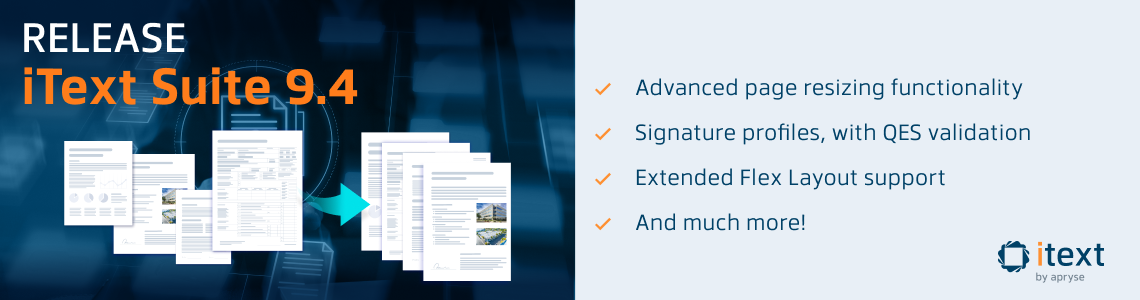
For our fourth and final release of 2025, we’re pleased to announce the release of iText Suite 9.4. It includes iText Core 9.4.0, which features new high-level functionality for advanced page resizing, along with further improvements for digital signature validation.
We’ve also added support for more CSS Flex Layout features in both iText Core’s layout engine and the pdfHTML add-on, which will particularly benefit PDF templating use cases.
As always, you’ll find full details on all new features, improvements, and bug fixes in the release notes for iText Core and its add-ons in our Knowledge Base.
iText Core 9.4.0
Advanced Page Resizing
The new PageResizer class (Java/.NET) enables users to merge PDF documents with different page sizes in a much more effective way than previously. It’s a comprehensive solution for scaling content between different page formats (A0, A1, US Letter, etc.), while maintaining correct aspect ratios, and gracefully handling content such as annotations, patterns, gradients, and form fields.
The result is a more flexible and reliable toolkit for document assembly and transformation, ensuring that content integrity and layout are preserved across diverse PDF workflows.
We’ve created some examples to demonstrate usage of this new class, so refer to the release example on the iText Knowledge Base for more information.
Regional Signature Validation Profiles
Adding to the support for the EU List of Trusted Lists from the previous release, iText Core 9.4.0 now brings further enhancements for validating digital signatures. With the introduction of regional profiles, users will no longer have to care whether their digital signing processes meet the requirements of regional legislation. Instead, you can simply choose a preset regional profile and let iText handle all the hard work of ensuring signatures and certificates are valid for that region.
As a demonstration of this capability, we’ve updated the LotlSimpleSignatureValidation (Java/.NET) example from the previous release to show the new QualifiedValidator (Java/.NET) class. This class determines whether certificates/signatures meet the standards to be a Qualified Electronic Signature (QES).
More profiles will be added in future releases, though you can of course create your own using this example as a basis.
Extending Flex Layout Support
This release significantly improves the flex layout support in the core Layout module. As this is most relevant for the pdfHTML add-on, we’ll cover this in the following section.
pdfHTML 6.3.0
Major Flexbox Improvements
The CSS Flexible Box Layout module (commonly known as Flexbox) is a popular choice for responsive designs. Since we introduced support for it in pdfHTML 3.0.4 we’ve continued to expand our coverage, making it easier to create complex, responsive layouts for your PDFs.
The improvements for this release are based on a thorough review of our flexbox capabilities and customer requests. We’ve added support for more complex justify-content values, enabling more advanced alignment options in flex layouts. Another addition is the align-self property, meaning that individual flex items can now override container alignment for more granular control.
With these updates, Flexbox is now comprehensively supported by pdfHTML. To see what other CSS and HTML features are supported, you can refer to this overview on the iText Knowledge Base.
In addition, the general handling of CSS tokens with escaped code points has been improved, making CSS parsing more standards-compliant and robust overall.
Accessibility & Standards Compliance
We’ve added support for aria-label and <label> elements as alternative descriptions for <textarea>. This not only brings parity with <input> elements, it also directly improves PDF/UA compliance since it ensures form fields in the resulting PDF are tagged with accessible names for assistive technologies to interpret.
Previously, <textarea> elements could lack proper alternative text if not using title or other supported attributes. However, developers can now rely on standard HTML accessibility practices and be sure pdfHTML will map them to the PDF’s accessibility tags correctly.
pdfOptimizer 4.1.1
Font Subsetting Improvements
This release focuses on improving the reliability of the font subsetting optimization from the previous release. Thanks to customer feedback and internal testing, we’ve addressed several important issues where font merging could break documents, particularly when merging subsetted TrueType fonts with incompatible cmap tables.
pdfXFA 5.0.4
A customer reported an issue with content overflowing on certain pages of a document, after they updated from an earlier version. Our investigations determined this was a regression in our forced-placement logic following a fix for redundant pages implemented in pdfXFA 4.0.1, which could result in content being laid outside of the page boundaries. This is now resolved.
Patch Releases for Compatibility
pdfCalligraph 5.0.4
Patch release to maintain compatibility with iText Core 9.4.0 dependencies.
pdfOCR 4.1.1
Patch release to maintain compatibility with iText Core 9.4.0 dependencies.
pdfSweep 5.0.4
Patch release to maintain compatibility with iText Core 9.4.0 dependencies.
Pull Requests
For this release, thanks go to Aviad Pineles for their PR to improve CSS style sheet logic for pdfHTML. While we eventually went with a different implementation of this fix, we’re very grateful for the inspiration!
We’d also like to thank IBaltaga for their suggested NotSupportedException if AreaBreak is inside a flex container fix for .NET. After investigating in more detail, we decided to implement the fix in a different way. However, an exception will no longer be thrown for AreaBreaks inside flex containers.
Please feel free to visit our GitHub if you want to contribute to iText.
Bug Fixes and Miscellaneous Improvements
Enhancements for PDF image and color depth handling have been made for extracting images. Additionally, there are some general accessibility and structure enhancements for generated/tagged documents, as well as improved and error messaging and recovery for malformed or edge-case PDFs.
For more details on other improvements and bug fixes, see the release notes for Core and the add-ons on the Knowledge Base.
Showcase PDF
As always, we’ve made the iText Core release notes into a showcase PDF document. Not only does it conform to the latest PDF/UA-2 standard for accessible PDF documents, as well as the PDF/A-4F archiving standard, it’s also digitally signed. You can find the source code and resources required to recreate the document yourself embedded. Have fun!
Get Started with iText Suite 9.4
If you’re completely new to iText, we highly recommend our free 30-day trial. This lets you try out the entire iText Suite: so not just iText Core, but also all our open and closed source add-ons, completely free.
And because the trial is covered by the terms of our commercial license, you can rest assured your intellectual property is safe. The AGPLv3 conditions do not apply to commercial license holders, so your code can remain closed-source if that is a concern for you.
As ever, happy coding!